Throughout this course, we have looked a variety of intricacies of the PC and its uses. This week we will look at virtualization. Virtualization is part of enterprise computing and is the abstraction between the various computer sources such as CPU, Memory, Storage and NIC. The basic idea of virtualization is the fact that many different tasks may have to be completed in the same time frame, so the computer works on "virtual" computers to get each task done while relying on only one physical host computer.
So, this may seem confusing to some, but let's break it down a little more. The difference between a physical and virtual machines comes down to the actual parts of a machine. For instance, physical machine parts of a computer are dedicated resources, device drivers specific to hardware, multiple PM or boxes and the fact that one must by operating system licenses to utilize such material. Virtual machines, on the other hand, consist of shared resources, generic device drivers, multiple VMs take up only one box and OS licenses are required. One of the main differences is the fact about device drivers; VM utilize generic device drivers that make migration easy and deployment rapid.
There are obviously incentives for utilizing VM. Some of these benefits include: less money spent on technology support as there are multiple OS on just one physical host, VM portability, security. The biggest part for me is security. The fact that VM are easily restored to previous settings and do not mess up the integrity of the physical host makes it an ideal situation. Even servers that utilize VM have benefits such as utilizing space at a maximum and consolidation of information.
As you can see, there are many reasons why virtualization is an important part of the business world as well as the computer world. It saves time, money and space which are key factors in business!
Thursday, April 15, 2010

Secure Email Project

Above is my Mozilla Thunderbird account opened with my two emails from the ISM professor. This project taught me how important it is to utilize secure email to ensure that private information does not fall into the wrong hands or go public. As I enter into the work force, I will keep this in mind when I am computing from work about private corporate information as well as when I am at home computing about my finances or paying bills online.
The article I read was "Indicted suspect allegedly breaks for credit-card data theft." It is about a man who was convicted of breaking into TJMaxx, BJs wholesale, Marshalls, Office Max, Barnes and Noble and Sports Authority. He stole credit card information from millions of customers and accrued millions of dollars through this terrible deeds. This goes to show that many companies, especially retailers can be vulnerable to security problems. If aforementioned companies had utilized an encryption based system to store credit card numbers, Gonzalez (the thief) would have never been able to hack into their systems. Gonzalez utilized the exploitation of weak computer networking systems to steal a large amount of each company's customer base.
The article I've mentioned goes along with the security topic we encountered last week. One of the most important lessons I learned this semester was the fact that computer networks should be solid and secure before you utilize them as a company, consumer or personally.
Sunday, April 11, 2010
Week 13: Clear
Although the invention of the internet was a great thing, it is important to realize how much easier it is for someone to get a hold of your personal information. Through viruses and worms you and your computer could be at risk. Illegal activities happen each day to thousands of people across the world. Although many hackers create these destroying programs just because they can, many also create these programs to steal passwords and credit card information. This brings us to the most imperative point of today: computer security risk. Computer security risk is the activity that causes damage to computer hardware, software, date, information and its ability to work properly. Nowadays, there is such a thing as cybercrime-- internet-based illegal activities that place one's computer in harm's way. An interesting fact from the textbook is "Today, cybercrime is one of the FBI's top three priorities." This goes to show just how pertinent it is today.
There are a few key players you should be afraid of :hackers, crackers, script kiddie, cyberextortionists and cyberterrorists. A hacker once was used to describe a person who was great with computers, but now describes anyone who is able to access your computer without your consent, which leads to illegal activity. A cracker is similar to a hacker but delves deeper into criminal activity and either destroys or steals one's information from accessing his or her computer. A script kiddie is a step down from a cracker on computer knowledge and skill but usually utilize prewritten programs to break into computers. Cyberextortionists utilize e-mail as their vehicle to send threatening messages in order to exploit a person or company stating that private information will be exposed if action is not taken. A cyberterrorist utilizes computer attacking to front politcal actions or reasons; electric companies, air traffic-controllers and many other sources that reach millions each day are at risk.
It is important throughout one's computing to be aware of these types of people, who are only out in the world to cause harm to you and perform illegal activities on the internet. These people will go to great lengths to put viruses, worms or trojan horses on your computer or network to take command of your computer and all of your information. Don't let this happen to you! It is easy to take control of your online destiny, by following some of the tips from the interview with Ms. Kelly Bergsma who stated that computer users should always update one's PC with patches, utilize an anti-virus software and always be wearly of websites and unknown persons. For more information about computer security please check this link.
There are a few key players you should be afraid of :hackers, crackers, script kiddie, cyberextortionists and cyberterrorists. A hacker once was used to describe a person who was great with computers, but now describes anyone who is able to access your computer without your consent, which leads to illegal activity. A cracker is similar to a hacker but delves deeper into criminal activity and either destroys or steals one's information from accessing his or her computer. A script kiddie is a step down from a cracker on computer knowledge and skill but usually utilize prewritten programs to break into computers. Cyberextortionists utilize e-mail as their vehicle to send threatening messages in order to exploit a person or company stating that private information will be exposed if action is not taken. A cyberterrorist utilizes computer attacking to front politcal actions or reasons; electric companies, air traffic-controllers and many other sources that reach millions each day are at risk.
It is important throughout one's computing to be aware of these types of people, who are only out in the world to cause harm to you and perform illegal activities on the internet. These people will go to great lengths to put viruses, worms or trojan horses on your computer or network to take command of your computer and all of your information. Don't let this happen to you! It is easy to take control of your online destiny, by following some of the tips from the interview with Ms. Kelly Bergsma who stated that computer users should always update one's PC with patches, utilize an anti-virus software and always be wearly of websites and unknown persons. For more information about computer security please check this link.
Friday, April 2, 2010
Database Project
When our professors said to start this project early, they weren't kidding. Although I thought I had allotted ample time to work through the project and complete it this past week, I soon realized that I would be spending my Friday night finishing up the project, so I could enjoy my Easter weekend. I initially expected Access to be a lot like Excel in the aspect that tooling around with it will generally point you in the direction you intended; I was dead wrong.
This project was a great learning experience for me because I had never worked with Access before. After watching the database lectures (a few times), I finally got to understand the nature of the beast. Some downsides to my trial-and-error technique in order to familiarize myself with the program ended quite terribly as I ended up deleting my database a few times and starting fresh. However, I do think that I have firmly grasped the beginnings of Access. It was great to learn the basics such as creating various tables, forms and reports. I think the greatest piece of information I learned was how to import and export information from Excel, Access, etc. This will definitely help me in the real world as I will be working with Excel on a daily basis. Learning how to make order forms by extracting information from other tables and queries was a tremendous thing to learn because I will be making and placing orders in the field of merchandising upon graduation.
This brings me to my next point. How is Access going to help me function in the real world? Most of my ideas come to mind in the retail industry because so much emphasis is placed on the customer. Due to the fact that Access can take thousands of customers from a database and filter that information, I think this will prove helpful when I am analyzing buying patterns and customer preferences. Additionally, one could also send out coupons to a certain grouping of customers, such as all customers in Florida or all Female customers who have spent $500.00 at Store A Year-To-Date. Even though Access may be challenging to overcome, the possibilities with filtering and analyzing data is endless. It makes me wonder just how many companies are under-utilizing Access as we speak and could really gain perspective on their customers from cold hard data.
This project was a great learning experience for me because I had never worked with Access before. After watching the database lectures (a few times), I finally got to understand the nature of the beast. Some downsides to my trial-and-error technique in order to familiarize myself with the program ended quite terribly as I ended up deleting my database a few times and starting fresh. However, I do think that I have firmly grasped the beginnings of Access. It was great to learn the basics such as creating various tables, forms and reports. I think the greatest piece of information I learned was how to import and export information from Excel, Access, etc. This will definitely help me in the real world as I will be working with Excel on a daily basis. Learning how to make order forms by extracting information from other tables and queries was a tremendous thing to learn because I will be making and placing orders in the field of merchandising upon graduation.
This brings me to my next point. How is Access going to help me function in the real world? Most of my ideas come to mind in the retail industry because so much emphasis is placed on the customer. Due to the fact that Access can take thousands of customers from a database and filter that information, I think this will prove helpful when I am analyzing buying patterns and customer preferences. Additionally, one could also send out coupons to a certain grouping of customers, such as all customers in Florida or all Female customers who have spent $500.00 at Store A Year-To-Date. Even though Access may be challenging to overcome, the possibilities with filtering and analyzing data is endless. It makes me wonder just how many companies are under-utilizing Access as we speak and could really gain perspective on their customers from cold hard data.
Thursday, April 1, 2010
Week 12: Clear
Throughout this week, we learned about Information Systems Development. This seems to be one of the topics I knew least about, so it was refreshing to learn something new that will really help me understand the business world a bit better. Let's start off with the basics as this seems to be the most relevant information to me as a graduating senior.
In the business world, there are various careers and occupations that are solely responsible for the managment of system operations and information systems. First off, information systems is the overall culmination of every single input that produces information, such as hardware, software, data, personnel and business processes. Within information systems is a cycle called the System Development Cycle. The steps are as follows:
In the business world, there are various careers and occupations that are solely responsible for the managment of system operations and information systems. First off, information systems is the overall culmination of every single input that produces information, such as hardware, software, data, personnel and business processes. Within information systems is a cycle called the System Development Cycle. The steps are as follows:
- Planning
- Analysis
- Design
- Implementation
- Operation, Support and Security
Systems Analysts are responsible for making sure this cycle flows properly and each requirement of a certain task is executed. Some of their job taks are
- Alleviate Obstacles
- Determine necessary steps
- Define the parameters of the given project
- Control problems at hand and fix them
For the most part, system analysts are responsible for delegating and communication to everyone in the task force and are not responsible for producing or completing the given project. After listening to the interview with Miss Christine Schoaff, it is apparent that there is a multitude of job titles (systems analyst, project manager, etc.) and an infinite amount of job requirements depending on the depth and breadth of the project and company.
To delve a little further into systems analysis, it is important to realize the pros and cons of such a business design. Whether a system will fail or succeed varies greatly on how well designed the system is; some qualities associated with a well-designed system include: being cost effective (the outcome outweighs the input of capital and persons), easy to implement, and meet or exceeds expections and objectives. Deviations from this occur, but when the opposite tends to happen the design is likely to fail or be abandoned.
Many project managers utilize software in order to lay out the gridwork for a given project such as the estimated cost and time, required activites and a timeline. As mentioned earlier, there are five steps in the System Development Cycle. Planning and Analysis are the first two, respectively, and start the process by reviewing project requests, prioritizing activities and determing whether each request is feasible. The next step, design, works on gathering the necessary tools to execute the given task and set schedules to stay on task. Step four or implementation is the process of executing the tasks at hand being sure that goals are met in a timely manner and each aspect of a project is addressed. Operation, Support and Security or the final step includes the upkeeping, monitoring and securing the project while measuring effectiveness.
For more information on this imperative business operation please check here.
Tuesday, March 30, 2010
Creating an Avatar
 courtesy of FaceYourManga.com
 This is my avatar. It was interesting to create my avatar because there were so many different hair cuts and facial styles. I ultimately think this avatar kind of looks like me, but it's hard to cartoonize yourself. I used Face Your Manga to make my avatar and it was a fairly simple process. I remember a few years ago I tried to make an avatar and the program I used was sort of difficult.
Sunday, March 28, 2010
Week 11: Clear
Databases start off simple but gradually get harder depending upon what data one is working with. Let's start off with the basics of database management. First of all it is important to know why exactly we use databases; databases can be used for a variety of reasons ranging from decision making to enterprise uses. Some of the key uses for databases are as follows: charts, reports, stats, web analytics, Customer Relations Management, social networks, user preferences, etc. When utilizing a database, we are inputing unorganized data and receiving organized useful information. Databases allow you to add, change and delete data, which is how most of us facilitate our need for information. One can also sort and retrieve the given data and perform reports and charts.
The database we have worked with in this course is called Microsoft Access. Access is utilized by a multitude of people who may need a database for personal or professional purposes. It is important to understand that the basis for databases is the data that you may input into the program. There are many integral parts that make databases work properly, but data integrity is one of the most important attributes. Data integrity is based upon the quality of the information at hand. One common saying is "Garbage in, Garbage out," which basically means incorrect or insufficient data will reap incorrect or insufficient results leading to inconclusive databases.
Going off this topic is the idea of the importance of valuable information. Just what exactly is valuable information when forming a database? Well, there are a few qualities that can lead you in the right direction. Information must be free of errors in order to escape the clutches of "Garbage in, Garbage out." Information must be verifiable meaning one could check the resources of a given data in order to prove the data is up-to-date and correct. Speaking of being up-to-date, data should be within a given time period that is relevant to the current question at hand. Would you want to know about customer loyalty from twenty years ago without knowledge of current customer loyalty? Maybe, but more present information sheds light on to current situations. Information should be organized, accessible, and useful or else the information has no bearing on a certain topic. Last but certainly not least, information must be cost-effective; if information is quite costly and reaps little to no profits in comparison, one is, in fact, losing money on the research.
As you can see, database management can be timely and must be carefully executed in order to reap targeted results. In the business world, it is of utmost importance to gain valuable knowledge and following these helpful hints will certainly put you on your way. For more information visit: database management,
The database we have worked with in this course is called Microsoft Access. Access is utilized by a multitude of people who may need a database for personal or professional purposes. It is important to understand that the basis for databases is the data that you may input into the program. There are many integral parts that make databases work properly, but data integrity is one of the most important attributes. Data integrity is based upon the quality of the information at hand. One common saying is "Garbage in, Garbage out," which basically means incorrect or insufficient data will reap incorrect or insufficient results leading to inconclusive databases.
Going off this topic is the idea of the importance of valuable information. Just what exactly is valuable information when forming a database? Well, there are a few qualities that can lead you in the right direction. Information must be free of errors in order to escape the clutches of "Garbage in, Garbage out." Information must be verifiable meaning one could check the resources of a given data in order to prove the data is up-to-date and correct. Speaking of being up-to-date, data should be within a given time period that is relevant to the current question at hand. Would you want to know about customer loyalty from twenty years ago without knowledge of current customer loyalty? Maybe, but more present information sheds light on to current situations. Information should be organized, accessible, and useful or else the information has no bearing on a certain topic. Last but certainly not least, information must be cost-effective; if information is quite costly and reaps little to no profits in comparison, one is, in fact, losing money on the research.
As you can see, database management can be timely and must be carefully executed in order to reap targeted results. In the business world, it is of utmost importance to gain valuable knowledge and following these helpful hints will certainly put you on your way. For more information visit: database management,
Sunday, March 21, 2010
Week 10: Clear
There are four types of networks discussed in class such as LAN, PAN, WAN and MAN. These abbreviations all stand for exactly what each network is capable of. For instance, LAN stands for Local Area Network, which means that it can connect computers and internet-capable devices in a limited area. Most homes, nowadays, have local area networks, which enables all the computers in a home to be connected via the network. Each computer or device in a given network is called a node. These nodes can be physically connected by cables or wirelessly depending on whether the network is a land line or wireless. LANs are critical for various business models because it allows access to the internet and also ties computer accessories to the computers such as software or printers. This makes the business world a more fluid workplace and is quite effective. In every network, there is a server which acts as the liaison between every machine and provides services to the other nodes such as work documents, software or internet.
With the advent of networks there are pros and cons to the great ability. First of all, networks provide synergy by connecting all given devices. This, in turn, increases productivity and facilitates communication. Additionally, networks provide the advantage of sharing hardware (disks) and sharing software but be advised that this could also be a con due to the fact that corrupt files could easily damage and entire network. Another caution to take with networks is the fact that some software sharing is illegal depending on the terms of use. A few other disadvantages with networks are the lack of privacy, security threats and cost of initial use and/or maintenance.
For more information on internet networks please check here.
Saturday, March 20, 2010
Excel Project

I utilized the Excel help function a few times in order to figure out what formula to use next, which proved very helpful. Although the help window did not explicitly train me how to draw up a function, it was a great starting point. As I mentioned before, I thought that the pivot tables would be harder to navigate than the raw data formulas. Once I gained concentration on the pivot table tasks it was easy to manipulate the data, but I realized quickly that my information didn't make too much sense considering the data. After looking through my raw data sheet multiple times and feeling frustrated, I found one miniscule error in one of my larger formulas. Without catching this error, I would have ruined all the data I had about the excercise and heart rates. The error I made was " =IF(F3>=E3,"Yes", "No")," which seemed correct to me, but i realized that I needed to add in extra paranthesis to allow the spreadsheet to realize that there was only one formula in that strand of information. So my correct formula is "=IF((F3>=E3),"Yes","No")." This jogged my memory to remember that my CGS teacher my freshman year would always remind us to add in extra parentheses as an extra precaution. Once I fixed this formula and refreshed my pivot tables, everything fell into place.
This Excel project has been one of the most valuable projects I have done throughout my college career. Not only have I learned a lot about Excel, but I have picked up great tips about excel processing that I will carry with me into the real world. I now realize that I must be very careful with my formulas and add extra parentheses when necessary!
Thursday, March 4, 2010
Week 9 Clear
Many students are quite intimidated by Microsoft Excel. Although most students are very skilled in Microsoft Word and Microsoft Powerpoint, there seems to be a disconnect from when we are very young with Excel. I think the biggest problem is that Powerpoint and Word are used in school projects when we are even in grade school; Excel is used for financial bookkeeping for the most part, which, unless you're a child prodigy, most of us don't use as a child.
One of the biggest obstacles of Excel is learning the basics. Let's start there. Excel is chock full of rows and columns. These rows and columns meet at specific cells where we can input numeric or textual information. Columns are labeled with letters and are the vertical categories; there are currently 16,384 columns per sheet. Rows are numbered and are organized horizontally; there are 6500 rows in Excel 2003 and 1,048,576 in Excel 2007 per sheet. An Excel document can have multiple sheets which can even extract information from one sheet to formulate or populate the other.
Each cell is addressed with a column letter followed by a row number. For example the first cell in every spreadsheet is A1. The column or letter is always first. Sometimes you may have thousands of cells within a given spreadsheet you are working with. In this case, it is helpful to know some shortcuts to navigate such a large document. Some keyboard shortcuts to move to the very end of cells are listed here:
One of the biggest obstacles of Excel is learning the basics. Let's start there. Excel is chock full of rows and columns. These rows and columns meet at specific cells where we can input numeric or textual information. Columns are labeled with letters and are the vertical categories; there are currently 16,384 columns per sheet. Rows are numbered and are organized horizontally; there are 6500 rows in Excel 2003 and 1,048,576 in Excel 2007 per sheet. An Excel document can have multiple sheets which can even extract information from one sheet to formulate or populate the other.
Each cell is addressed with a column letter followed by a row number. For example the first cell in every spreadsheet is A1. The column or letter is always first. Sometimes you may have thousands of cells within a given spreadsheet you are working with. In this case, it is helpful to know some shortcuts to navigate such a large document. Some keyboard shortcuts to move to the very end of cells are listed here:
CTRL and the down arrow
END and down arrow
CRTL and END
Additionally, it is important to know how to quickly get to the top of a spreadsheet instead of scrolling up and across. A shortcut to implement this is CTRL and Home. This will bring you directly to A1. Along with shortcuts comes organization; in order to properly organize a Excel document that has multiple sheets being used, it is important to rename worksheets based on the information in each folder. To do this, simply double-click on the sheet tab on the bottom of the screen and type in any title.
Once you've gotten used to some of these techniques, you're ready for more advanced Excel techniques such as cell input. Data inputs into Excel as a numeric value is always right justified and text input is always left justified. Sometimes it is crucial to have numeric values that are left justified, but the user must force the cell to record the input as text data. To do this place a ' or single quote in front of the numeric value. To add a new row/column or delete an existing one, highlight a specific cell, right click and from the drop down menu press "insert... entire row/column." To adjust a column's width, yet another important trick to display all information in a given column, place the cursor on the line in between the two columns and drag to the specific size wanted.
These are the how-to basics of Microsoft Excel. The best way to get the hang of it is to practice, practice, practice. Excel skills are highly important upon graduating college as many jobs in the U.S. rely heavily on spreadsheets in virtually every field from finance to engineering to retail. Getting a good grasp on Excel now will give you a great competitive advantage while you look for jobs as well as in the workforce during your first job. For more information visit this helpful site.
Saturday, February 20, 2010
Week 7 Clear
Throughout this course, I have learned a multitude of information that I didn't expect to learn, especially this week! In week 7, we have discussed how computers boot up, the difference between applications and system software and system utilities like anti-virus software. Although it might be easy to discern which each topic involves, there is much more than the eye can see.
Booting a computer is one of the first things that any PC user learns to do. But most of us never learn much more about booting a computer than pressing the 'on' button or restarting the computer through Windows operations and commands. Booting up a PC is not difficult, but it is important to fully understand the parameters of various ways of starting up a computer. For instance, before this lecture I didn't even know there was such a thing as cold boot or warm boot. A cold boot is when the computer is physically off and is allowed to cool for a few seconds before turning on-- this allows the computer to erase any cached memory and only saves files that have been permanently saved. A warm boot usually takes the form of a restart. From this point, the computer must go through a series of steps in order to properly boot up. The computer then runs code in BIOS (Basic Input/Output System) in order to configure ROM, motherboard, and storage settings. The next step is to Power On Self Test or POST, which tests the Operating System to ensure that set-up can continue. The following step is to utilize tiny boot loader program from the Master Boot Record (MBR), followed by loading the second stage boot loader. This, in turn, allows the MBR to turn over the controls to the Operating System, which enables the user to take command.
Applications and systems software are crucial elements of each and every computer. Without applications and systems software, our computers would not be able to do anything except utilize electricity to start the boot up process. First, let's look at what software is in general: the basic instructions a computer needs to run. Software acts as a "Simon Says" type of control, such that a computer only does what its software instructions tell it to; otherwise, nothing happens and you basically got a hunk of metal, plastic and other materials constructed together. Application software helps you accomplish a task such as Microsoft Word when you type a document. Systems software is a culmination of multiple programs that work together to ensure a smooth computing processes. Systems software works as the middle man between a PC's hardware and an application.
System utilities come in a variety of ways. All are small and are not resident, so they are used when the user enables them or when user-settings give the utility the O.K. Some utilities are packaged with the operating system, such as screensavers or firewalls; but some are purchased through vendors like Norton Anti-Virus. Utilities are used in order to ease user capabilities and to increase productivity. When utilizing utilities, it is important to check for updates fairly often to ensure that your PC is being protected and running as smooth as possible.
For more information on this topic, please utilize this website to gain more expertise in the field. In the business world, it is crucial to always make sure you are on top of the current technology and keeping up-to-date on applications, system software and system utilities.
Booting a computer is one of the first things that any PC user learns to do. But most of us never learn much more about booting a computer than pressing the 'on' button or restarting the computer through Windows operations and commands. Booting up a PC is not difficult, but it is important to fully understand the parameters of various ways of starting up a computer. For instance, before this lecture I didn't even know there was such a thing as cold boot or warm boot. A cold boot is when the computer is physically off and is allowed to cool for a few seconds before turning on-- this allows the computer to erase any cached memory and only saves files that have been permanently saved. A warm boot usually takes the form of a restart. From this point, the computer must go through a series of steps in order to properly boot up. The computer then runs code in BIOS (Basic Input/Output System) in order to configure ROM, motherboard, and storage settings. The next step is to Power On Self Test or POST, which tests the Operating System to ensure that set-up can continue. The following step is to utilize tiny boot loader program from the Master Boot Record (MBR), followed by loading the second stage boot loader. This, in turn, allows the MBR to turn over the controls to the Operating System, which enables the user to take command.
Applications and systems software are crucial elements of each and every computer. Without applications and systems software, our computers would not be able to do anything except utilize electricity to start the boot up process. First, let's look at what software is in general: the basic instructions a computer needs to run. Software acts as a "Simon Says" type of control, such that a computer only does what its software instructions tell it to; otherwise, nothing happens and you basically got a hunk of metal, plastic and other materials constructed together. Application software helps you accomplish a task such as Microsoft Word when you type a document. Systems software is a culmination of multiple programs that work together to ensure a smooth computing processes. Systems software works as the middle man between a PC's hardware and an application.
System utilities come in a variety of ways. All are small and are not resident, so they are used when the user enables them or when user-settings give the utility the O.K. Some utilities are packaged with the operating system, such as screensavers or firewalls; but some are purchased through vendors like Norton Anti-Virus. Utilities are used in order to ease user capabilities and to increase productivity. When utilizing utilities, it is important to check for updates fairly often to ensure that your PC is being protected and running as smooth as possible.
For more information on this topic, please utilize this website to gain more expertise in the field. In the business world, it is crucial to always make sure you are on top of the current technology and keeping up-to-date on applications, system software and system utilities.

Sunday, February 14, 2010
Week 6 Clear
As this course progresses we are getting into more specific points of information. This week's topic was storage. Let's start off with the basics of storage. The layman defintion of storage is the ability to store data or information for a later time. Storage is one of the most crucial parts of a PC because it holds all data that we use more than once. We can store word documents, pictures, and pretty much anything else imaginable; storage is like memory in the fact that we utilize both in order to keep instructions from previous use and recall a variety of documents in no time at all. One large difference between memory and storage is the actual cost of installing each when building a PC. Memory costs approximately $30/GB and storage only costs $.12/GB; however, this is for good reason because memory works at a much faster pace than storage.
There are three different types of storage but most of us only use the first two. These types are primary, secondary and tertiary storage. Primary storage is online storage that is immediately available and the PC user is not required to connect the PC to any external storage unit (information is already on the harddrive). Secondary storage is near-online storage which requires the PC user to connect the PC to an external storage unit such as a junk drive, floppy drive, CD or DVD. The last type of storage is rarely used in every day computing but is nonetheless important to anyone who is learning about storage. Tertiary storage or offline storage is not readily available for the consumer to use and is stored on magnetic strips or tapes, making use extremely difficult for a basic user.
Once you've got the basics of storage, it's important to learn about the disposal of storage. There's a controversial issue over storage disposal because computers save files underneath the accessible service that average user could find or even delete. Deleting stored files on the surface can be easy to do, but to permanently delete stored items is a completely different story. Utilizing near-online storage devices, your best bet is to physically destroy the CD, USB or DVD. Another consideration is to utilize the 3-pass overwrite which basically means deleting a file while continuing to add other files leaves no room for back-up storage of deleted files. It's important to keep your files safe and secure. This means either deleting them or utilizing laws that keep files private that are private matters such as student, financial or medical files.
For more information on this topic, please utilize this website that will act as a great springboard: computer data storage. In the business world, it's important to know how to store files as well as delete such files safely as confidential information is sent via transfering files and e-mails.
There are three different types of storage but most of us only use the first two. These types are primary, secondary and tertiary storage. Primary storage is online storage that is immediately available and the PC user is not required to connect the PC to any external storage unit (information is already on the harddrive). Secondary storage is near-online storage which requires the PC user to connect the PC to an external storage unit such as a junk drive, floppy drive, CD or DVD. The last type of storage is rarely used in every day computing but is nonetheless important to anyone who is learning about storage. Tertiary storage or offline storage is not readily available for the consumer to use and is stored on magnetic strips or tapes, making use extremely difficult for a basic user.
Once you've got the basics of storage, it's important to learn about the disposal of storage. There's a controversial issue over storage disposal because computers save files underneath the accessible service that average user could find or even delete. Deleting stored files on the surface can be easy to do, but to permanently delete stored items is a completely different story. Utilizing near-online storage devices, your best bet is to physically destroy the CD, USB or DVD. Another consideration is to utilize the 3-pass overwrite which basically means deleting a file while continuing to add other files leaves no room for back-up storage of deleted files. It's important to keep your files safe and secure. This means either deleting them or utilizing laws that keep files private that are private matters such as student, financial or medical files.
For more information on this topic, please utilize this website that will act as a great springboard: computer data storage. In the business world, it's important to know how to store files as well as delete such files safely as confidential information is sent via transfering files and e-mails.
Saturday, February 13, 2010
Web 2.0 Project: The Christensens trek Italy

Please click here: http://voicethread.com/share/912558/
Above is my web 2.0 project. I have attached the link: Web 2.0 Italy in case the video doesn't work properly on my blog. To be honest, I didn't expect to have as much fun as I did on this project. It was a lot of work and I'm still tweaking my project to make the best that I can. This project made me think back to when my family and I went to Italy in 2007 and how much fun it was. I'm already thinking of how I can scrounge up some money to go to Italy and other parts of Europe this coming summer.
Thinking of a storyline was a little daunting at first because I had so much liberty to choose, I had a multitude of ideas. I finally decided on my Italy trip because it was a pleasurable experience and I now have an electronic copy that I can show friends and family for years to come. My next obstacle was choosing the story tool to utilize. It seems like there are literally thousands of tools online to use! I finally came to my decision after playing around of various sites and chose VoiceThread because of the various ways to add in your own personal touch. I watched a couple of tutorials before I got started on my Italy project and then realized that VoiceThread is very user-friendly. I was uploading pictures, posting comments, and recording audio in no time at all.
In order to receive feedback on my project, I will be looking forward to comments directly on my blog, please comment below! Also, I have created a survey on SurveyMonkey.com and here's the link:Click here to take survey. This will give my peers the opportunity to provide interaction on two different types of media and I'll be able to utilize this feedback when I decide to make more videos on other vacations I have taken in the past ( a virtual photo album, if you will). I haven't received much feedback yet, but a few of my friends have taken the time to watch my web 2.0 project and were absolutely amazed. Most had never heard of doing such a thing and wanted me to teach them how!
Through this project, I have been able to pick up much needed skills for a technological-based work environment. I will be graduating at the end of the semester and this gives me a competitive edge against some of my colleagues when I enter the workforce in a few months. Web 2.0 programs are a great way to present information in a more exciting format. I think this will be a great way for me to jazz up recaps of various projects I will be doing once I graduate.
Tuesday, February 9, 2010
Week 5 Clear
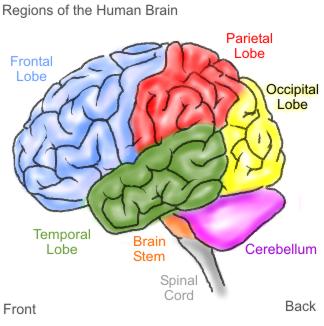
As we delve deeper into the technology we know and love, it's important to realize just how intricate computers really are. Now, you might be saying to yourself, " Why exactly do I need to know every inner-working of my computer?" It's quite simple; the better you understand the technology you utilize on a daily basis, the more efficient and effective you become at utilizing such technology. One of the most integral parts of a PC is the processor. A common name for a processor is the "brain of the PC." This goes to show that pretty much any process (hence the name processor) works through the processor in order to work properly.
Let's explore deeper into the mind of computers. The CPU or computer processing unit follows the orders of a running program in order to receive the necessary results the person is trying to receive. A processor has a cycle called a machine cycle; this cycle occurs in a series of steps to make one line of instuctions from a program complete. The machine cycle consists of four parts: fetch, decode, execute and store. Originally, when PCs were introduced decades ago, PCs would go through this process step-by-step, which would cause PCs to take a while to load programs and execute various tasks. CPUs have multiple components that work on each step of the machine cycle, which was the initial cause for slow processing. Now, CPUs utilize a technique called pipelining; pipelining is the basic idea that if there are multiple components working on various steps of a cycle, when one is finished, instead of waiting for the other components to be finished with that instruction, it can continue onto its next instruction. This saves time and alleviates some frustration an individual may have when waiting for a computer to finish a given task. Below is an example of pipelining.

Although pipelining may be fast enough for some, there are now processes far more advanced such as parallel processing. Parallel processing involves utlizing multiple processors on one motherboard. These processors work together to execute various processes or programs at once. Parallel processing is a faster alternative to the utilization of just one processor, much like a car having one engine with NOS as a booster of energy. In last ten years, parallel processing is capable with just one CPU, but it must be built as a hyperthreading cpu, dual core processor, or quad core processor. Hyperthreading utilizes one CPU but it shows on the computing system as two; it also increases performance by about 30% if there is support and application software in place. A dual core works even better than hyperthreading with two distinct processors with 50%-80% higher performance than a cpu with only one processor of similar clock cycle. A quad core processor works even better than a dual core processor working 50%-80% faster than a dual processor. Utilizing a quad core processor will overwhelming make your computer run faster.
References:
wpcontent.answers.com/wikipedia/commons/thumbs/c/cb/Pipeline_4_stage.svg/376px-pipeline,_4_stage.svg.png
quatumlearningblog.files.wordpress.com/2009/02/brain1.jpg
Sunday, January 31, 2010
Week 4: Clear
Application Software may seem obscure and the average adult with a PC may not realize he or she utilizes applications on a daily basis. All applications serve the purpose of creating user-based content; this is the defining line between an application or system software. For example, application software comes in a variety of forms such as games (Rock Band 2), organization programs (Turbo Tax). More specifically, applications can be classified based upon three categories: vertical vs. horizontal applications, software suites vs. standalones, and functional categories.
There is one defining difference between horizontal and vertical applications. Vertical applications are used in only one type of business or industry. Horizontal applications, on the other hand, can be utilized in a wide array of businesses and also on a personal basis. Vertical applications are mainly used for point-of-sale registers, customer relations management, and various other company-specific software. Horizontal applications include programs such as Microsoft Word, Itunes and Safari.
Another way to define applications is whether each application is a standalone or software suite. Standalone applications are capable of running on their own and are not bundled with other applications. Examples of standalone applications are Itunes and most web browsers (Firefox). Software suites are unlike standalones by the fact that the applications are bundled and share common features to increase ease. There are many reasons why software suites are great to use such as crossover and transferring information is easy, reduces training costs, increases productivity and easier to manage various accounts.
The last category is functionality. Functional applications are utilized in various types of business such as finance, desktop publishing, graphics and word processing. Each has a "go-to" application that is univerally used throughout each given industry; such examples are Quickbooks, Quark, Adobe Photoshop and Microsoft Word.
Applications are often overlooked, but make computing easier than ever. With time, any one can use virtually any application with little original knowledge. There are various websites to learn more about applications in general and it is best to go to an application's website to learn specifically about its inner workings. For more information utilize: http://www.ehow.com/how_4487281_use-computer-applications.html
This will really get the information flowing and allow avenues to learn more in-depth about interesting topics.
There is one defining difference between horizontal and vertical applications. Vertical applications are used in only one type of business or industry. Horizontal applications, on the other hand, can be utilized in a wide array of businesses and also on a personal basis. Vertical applications are mainly used for point-of-sale registers, customer relations management, and various other company-specific software. Horizontal applications include programs such as Microsoft Word, Itunes and Safari.
Another way to define applications is whether each application is a standalone or software suite. Standalone applications are capable of running on their own and are not bundled with other applications. Examples of standalone applications are Itunes and most web browsers (Firefox). Software suites are unlike standalones by the fact that the applications are bundled and share common features to increase ease. There are many reasons why software suites are great to use such as crossover and transferring information is easy, reduces training costs, increases productivity and easier to manage various accounts.
The last category is functionality. Functional applications are utilized in various types of business such as finance, desktop publishing, graphics and word processing. Each has a "go-to" application that is univerally used throughout each given industry; such examples are Quickbooks, Quark, Adobe Photoshop and Microsoft Word.
Applications are often overlooked, but make computing easier than ever. With time, any one can use virtually any application with little original knowledge. There are various websites to learn more about applications in general and it is best to go to an application's website to learn specifically about its inner workings. For more information utilize: http://www.ehow.com/how_4487281_use-computer-applications.html
This will really get the information flowing and allow avenues to learn more in-depth about interesting topics.
Sunday, January 24, 2010
Week 3: Clear
 (Image:
 Although most college students can get around pretty well on the internet, there is vast array of topics including history and just exactly how the internet and web pages work. As you can see in the image above, learning the intricacies of the internet can be a frustrating process.
One of the first topics one should learn is exactly how to get connected to the internet. Of course, one must have a working PC or laptop that has the capability of connecting to the internet; this means almost any PC is compatible minus dinosaurs from 1982. There are a two ways to actually connect to the internet: dial-up and broadband/DSL. Dial-up was the initial way that civilians connected to the internet and is quite antiquated due to the fact that it is a slow way to connect. Broadband/DSL is a much faster way to connect because you can connect a multitude of ways including wireless or satellite.
Once one is connected to the internet, one must use an internet browser which can be free or have a monthly fee. Free browsers include google chrome, mozilla, safari and internet explorer. Fee browsers include AOL and Earthlink, which are really service providers that serve as browers as well. In the 1990's, millions of people were weary of the internet and utilized fee-based internet browsers in order to have a sense of security; nowadays, many more people are comfortable with the internet and utilize free browsers to surf the net. In order to surf the net, one must type web addresses in the address bar. The address bar is the blank strip at the top of the page where one can type freely or copy and paste the specific address he or she would like to go to. An interesting fact about web addresses is that Http:// and www. are not necessary is the majority of addresses any more in order to minimize address error.
Once one has gotten the hang of browsing various webpages, such as toyrus.com, he or she can utilize search engines to search and find information all over the web. Some popular search engines include Google, Altavista and Yahoo!. As discussed in :Week 2: Clear," I mentioned just exactly how search engines find and categorize such information. In order to use a search engine, one must:
1.Type in the web address into the address bar
2.Press enter
3. Type in the subject he or she is searching for
4. Press enter
5. Look at results and pick the website from the list that suits his or her search best
Utilizing webpages and search engines is necessary in the business environment. In the 1960's and 1970's the U.S. government invented and perfected the use of the internet in order to connect scientists and government persons across the world sharing information. Nowadays, the majority of large companies utilize webpages in order to keep in touch with employees and clients alike. The 21st century is the technological era and every business must stay up on communications in order to stay relevant.
For more information on these given topics please visit some of these references listed below:
Sunday, January 17, 2010
Week 2: Clear
There are a wide variety of intricacies that go into computers. Although most of us rarely think about the inputs, outputs and various operating programs that make a computer run smoothly, but it is necessary in the business realm to be well educated on such processes of computers. In recent years, billions of people are connected to one another by computers in one form and another. Although there is a digital divide (gap between high income families and low income families and the disparity of internet access), it is important to realize that nearly all forms of business utilize computers with internet access for most, if not all tasks, one may be responsible for.
Some of the basics regarding computer knowledge are elementary to learn about; unfortunately, a lot of people do not take the time to learn about computer processes because time is spent learning processes only utilized in the job force. Another obstacle regarding computer knowledge is the fact that there are many emerging technologies and it is increasingly hard to become computer literate. One of the initial understandings necessary in order to become computer literate is to understand the information process. The information process cycle explains the ever continuous steps a computer utilizes in order to run. First, there must be an input of some sort to get information flowing such as a keyboard, mouse or scanner. The next step in the cycle is to process the thread of information coming from an external source by utilizing the PC's processor or operating system. Then, after digesting the information, the PC is capable of providing outputs which may show up as words typed on a screen (utilizing a keyboard as an input) or digital pictures showing up in the computer's photo gallery (using a scanner to scan copies of pictures). The last step is crucial in completing the information process and is called storage. Storage utilizes a computer's hard drive to save copies of a document and makes retrieval of information available. Here's a great website to learn the basics of the computer information process: http://www.jegsworks.com/Lessons/lesson1-2/lesson1-1.htm
Once one starts to understand the basics of computing, it is important to continuously learn and update one's knowledge of the capability of computers. Just think about how far human civilization has come in the realm of technology in the past few decades. In the 1950's, computers were as large as a small lecture hall, now we have handheld PC's in the form of telephones such as the iPhone, Palm Pilot and Blackberry. The amount of memory we have on laptops and PC's in general has expanded ten fold where as the amount of space an average size portable computer is roughly the size of a textbook. We are about to communicate via the web with intranets and internet making it easy for one to talk to a friend in China or in the other room with the same capabilities. Additionally, with the invention of the personal computer, we now can utilize various software and internet capabilities never thought possible with updated sound, graphics and video that make one feel he or she is actually at the event he or she is watching. Who knows what will come next involving computer technology, just make sure you continue to make yourself present and continuously learn more about computing as it is important to remain relevant and computer literate.
Some of the basics regarding computer knowledge are elementary to learn about; unfortunately, a lot of people do not take the time to learn about computer processes because time is spent learning processes only utilized in the job force. Another obstacle regarding computer knowledge is the fact that there are many emerging technologies and it is increasingly hard to become computer literate. One of the initial understandings necessary in order to become computer literate is to understand the information process. The information process cycle explains the ever continuous steps a computer utilizes in order to run. First, there must be an input of some sort to get information flowing such as a keyboard, mouse or scanner. The next step in the cycle is to process the thread of information coming from an external source by utilizing the PC's processor or operating system. Then, after digesting the information, the PC is capable of providing outputs which may show up as words typed on a screen (utilizing a keyboard as an input) or digital pictures showing up in the computer's photo gallery (using a scanner to scan copies of pictures). The last step is crucial in completing the information process and is called storage. Storage utilizes a computer's hard drive to save copies of a document and makes retrieval of information available. Here's a great website to learn the basics of the computer information process: http://www.jegsworks.com/Lessons/lesson1-2/lesson1-1.htm
Once one starts to understand the basics of computing, it is important to continuously learn and update one's knowledge of the capability of computers. Just think about how far human civilization has come in the realm of technology in the past few decades. In the 1950's, computers were as large as a small lecture hall, now we have handheld PC's in the form of telephones such as the iPhone, Palm Pilot and Blackberry. The amount of memory we have on laptops and PC's in general has expanded ten fold where as the amount of space an average size portable computer is roughly the size of a textbook. We are about to communicate via the web with intranets and internet making it easy for one to talk to a friend in China or in the other room with the same capabilities. Additionally, with the invention of the personal computer, we now can utilize various software and internet capabilities never thought possible with updated sound, graphics and video that make one feel he or she is actually at the event he or she is watching. Who knows what will come next involving computer technology, just make sure you continue to make yourself present and continuously learn more about computing as it is important to remain relevant and computer literate.
Week 1: Clear
Although I have had a lot of experience utilizing computers, I never thoroughly understood just how the search engines of the world received their information. One amazing fact that I learned was the mere fact that Google has over 1 trillion URLs in their database. To me, that almost seems imperceptible. Search engines have been around for just about twenty years now, which to me seems outrageous considering I was in diapers and computers were still considered a technology of the future.
However, the search engine as we know it is very different from its original model. Now, every one from students to grandparents use "google" as a verb and challenge the scope of one's knowledge by just "googling it." Although for the layman, it is merely that simple, there is much more below the surface that makes search engines tick. Search engines utilize bots to compile its database worth of URLs. These bots crawl on to websites taking keywords and links from the page performs this until it has reached the end of links (reaching the deepest pages in a website).
This bot searching takes seconds compared to an average person trying to look through pages upon pages of websites to receive the final information needed. After the bot has completed the search through the website, it is then filed into a large database where keywords are utilized to gather similar matches on websites across the Internet. A person can then search for the information he or she needs by simply typing in keywords in the query line to receive results with exact matches to his or her needs.
Search engines have become one of the driving factors in making the Internet easy enough for each every person to navigate. In the business world, this saves time and effort on educating each other on various topics one may not know a lot about to begin with. Virtually, any piece of information can be found on the internet in seconds flat because of search engines like Google and Yahoo. From a student's standpoint, search engines have helped me with term papers as well as research companies I have had interviews with. With more and more information out there on the internet, the only way to manage the information you want, need and inadvertantly receive is by utilizing search engines.
For more information on search engines, please visit: http://en.wikipedia.org/wiki/Web_search_engine. Although wikipedia may not be the end-all for researching information you may want, it gets one started on the right track to understand the basis of a variety of topics including search engines.
However, the search engine as we know it is very different from its original model. Now, every one from students to grandparents use "google" as a verb and challenge the scope of one's knowledge by just "googling it." Although for the layman, it is merely that simple, there is much more below the surface that makes search engines tick. Search engines utilize bots to compile its database worth of URLs. These bots crawl on to websites taking keywords and links from the page performs this until it has reached the end of links (reaching the deepest pages in a website).
This bot searching takes seconds compared to an average person trying to look through pages upon pages of websites to receive the final information needed. After the bot has completed the search through the website, it is then filed into a large database where keywords are utilized to gather similar matches on websites across the Internet. A person can then search for the information he or she needs by simply typing in keywords in the query line to receive results with exact matches to his or her needs.
Search engines have become one of the driving factors in making the Internet easy enough for each every person to navigate. In the business world, this saves time and effort on educating each other on various topics one may not know a lot about to begin with. Virtually, any piece of information can be found on the internet in seconds flat because of search engines like Google and Yahoo. From a student's standpoint, search engines have helped me with term papers as well as research companies I have had interviews with. With more and more information out there on the internet, the only way to manage the information you want, need and inadvertantly receive is by utilizing search engines.
For more information on search engines, please visit: http://en.wikipedia.org/wiki/Web_search_engine. Although wikipedia may not be the end-all for researching information you may want, it gets one started on the right track to understand the basis of a variety of topics including search engines.
Subscribe to:
Posts (Atom)